Sign five new clients and you’ve used your allowance
Docusign Pricing Unpacked: What You'll Actually Pay in 2026
Aug 07, 2026
12 mins

How much does Docusign cost? Clear your schedule.
You’ll need several tabs open. Possibly a spreadsheet. Maybe security clearance.
The monthly prices are on one page. Envelope limits are explained somewhere else. Overage charges get their own support article.
The information is there. It’s simply scattered across enough pages, tables, and footnotes to send you on a treasure hunt. The prize is discovering how much money you’re about to spend.
Read this before you buy - it could save you money. At the very least, it’ll save you an afternoon.
What we'll cover:
- How Docusign envelopes work
- Docusign Personal
- Docusign Standard
- Docusign Business Pro
- Docusign Enhanced
- Watch out before committing for a year
- What if you need support?
- What if you want to use their API?
Docusign pricing at a glance
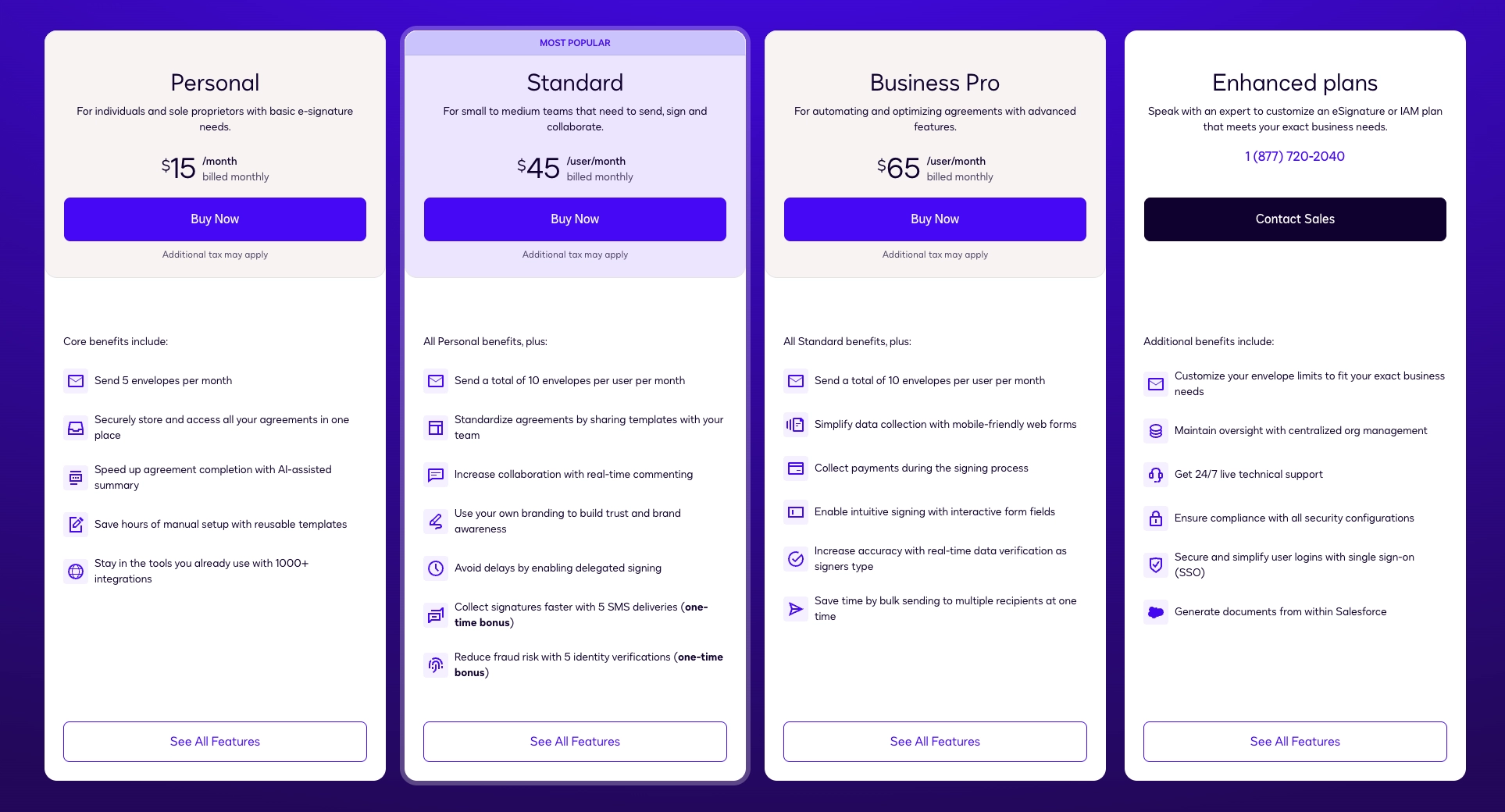
Let’s start with the numbers most people came for. These are Docusign’s genuine month-to-month prices, not the lower monthly equivalents you get for committing to a year.
Taxes, additional envelopes, and add-ons come on top.
What about Docusign's free plan?
Docusign offers a free forever plan, but it's primarily for you to sign documents sent to you by others.
You can only send three envelopes in total, so we've excluded it from the analysis below as it doesn't support any real business use.
What's a Docusign envelope?
Docusign measures sends in envelopes rather than individual documents. They function the same way a regular envelope you'd mail through the post does.
You can put up to ten documents into one envelope and send them together. That uses one envelope from your allowance, not ten.
The documents don’t even need to have the same signers.
Sounds like an easy way to stretch a low envelope allowance.
But there’s a catch.
If you want to control which recipients can see which documents, you need the document visibility feature. It lets you decide what each person can access inside the envelope instead of showing everyone its full contents.
Document visibility is only available on Docusign’s custom-priced Enhanced plans.
In practical terms, this means you can’t use one envelope to send unrelated documents to different clients just to save on sends on lower plans. You can, but your clients then have access to everyone's pricing, plus other confidential information inside your documents.
That’s why freelancers and small businesses shouldn’t estimate their Docusign usage by counting documents. Count how many separate clients you need to send to instead.
Docusign Personal
No room for a busy month
Docusign Personal costs $15 a month and gives one user just five envelopes per month.
Monthly allowance
If you send two or three contracts a month, that may be enough. The problem is that five envelopes leave very little room for a good month.
There’s no rollover either. You’re not building up unused envelopes during quiet months to cover the busy ones.
Need to resend a contract because the scope changed? That’s another envelope.
Sent one to the wrong email address? It still counts.
For a freelancer, that makes the plan difficult to grow with. The moment your client work picks up (which is presumably the idea), you’re counting sends and deciding which documents can wait until next month.
What’s missing
Docusign Personal handles signatures on documents you’ve already created. It doesn’t include:
Payments
A full editor for creating client documents
Interactive pricing tables that let clients choose between packages or add optional services
Detailed analytics showing which sections a client viewed and how long they spent reading them
Live notifications when a document is opened, forwarded, downloaded, or signed
With Docusign Personal, you'll still be writing the proposal in Word, exporting it as a PDF, uploading it for signature, and sending a separate invoice once it’s accepted.
What if you need extra envelopes?
Extra envelopes aren’t available on Personal. To keep sending, you’ll need to upgrade from $15 to at least $45 per month.
Docusign Standard
Three times the price, twice the allowance
Docusign Standard costs $45 per user a month and includes ten envelopes per user.
Monthly allowance
If one user sends five envelopes, your other user can still only send 10 and doesn't have access to the five unused envelopes. Something to keep in mind in case one of your teammates consistently sends larger volumes.
If you're a freelancer, you'll pay an extra $30/month for only five additional envelopes.
The envelope allowance isn't shared across the account.
Standard is where Docusign starts adding features for small teams.
You get shared templates, shared documents and folders, collaborative commenting, customized branding, team reports, and user permissions.
If several people regularly prepare and send agreements, the team features on Standard are truly useful. On the other hand, if you're a freelancer, you'll pay $30/month for five additional envelopes. That’s why Standard makes more sense as a collaboration upgrade than a volume upgrade.
What’s missing
Docusign Standard gives teams more control over the signing process. It still doesn’t include:
Payments
A full editor for creating client documents
Interactive pricing tables with selectable packages, quantities, and add-ons
Detailed analytics showing which sections a client viewed and how long they spent reading them
A custom domain for sending documents from your own branded URL
Custom onboarding flows with forms, booking calendars, and redirects
API access as part of the same subscription
Automatic document expiry dates
A small business rarely needs a signature in isolation. If you’re trying to simplify the whole process rather than only the signature, $45 per user still leaves quite a lot for other software to do.
For example, Better Proposals Premium starts at $29 per user per month and brings those steps into the same workflow. That's $16 less than Docusign Standard for 50 document sends shared across the account.
What if you need extra envelopes?
You can either buy them in advance or pay as you go. The rate you'll pay per envelope depends on whether you're on a monthly or annual subscription.
| Your subscription | Buy in advance | Pay as you go |
| Monthly | $4.50/envelope | $5.40/envelope |
| Annual | $3/envelope | $3.60/envelope |
Standard monthly + 5 extra envelopes
Buy in advance total on the left, pay-as-you-go total on the right

$22.50 for 5 envelopes
+ $45 subscription

$27 for 5 envelopes
+ $45 subscription
Docusign Business Pro
More features, still 10 envelopes
Docusign Business Pro costs $65 per user a month.
Monthly allowance
$20 more than Standard doesn’t buy you any more envelopes. You still get ten per user per month. What you're paying for is more functionality.
Don't mistake bulk sending for unlimited sending. With only ten included sends, the features designed to help you send at scale also help you reach your limit remarkably quickly.
Business Pro adds payments, signer attachments, advanced fields, Web Forms, PowerForms, Bulk Send, locked templates, drawing fields, and data verification.
Using Bulk Send creates a separate envelope for each of your recipients.
PowerForms also use an envelope whenever somebody completes one..
These features make Docusign more useful for businesses with complex agreement processes. You can collect payment when somebody signs, ask them to upload supporting documents, create self-service forms, and send the same agreement to several people in bulk.
Just don’t mistake bulk sending for unlimited sending.
What’s missing
On Business Pro, you can finally collect payments and use more advanced forms. It still doesn’t include:
A full editor for creating client documents
Interactive pricing tables with selectable packages, quantities, and add-ons
Detailed analytics showing which sections a client viewed and how long they spent reading them
A custom domain for sending documents from your own branded URL
Custom onboarding flows with forms, booking calendars, and redirects
API access as part of the same subscription
Automatic document expiry dates
Simultaneous document editing
Manager approvals before documents are sent
Even at $65 per user per month, there are still several roads leading to “contact sales”.
For comparison, Better Proposals' Enterprise plan starts at $49 per user per month. That’s $16 less and includes unlimited document sends, interactive pricing, detailed analytics, payment integrations, simultaneous editing, manager approvals, content locking, and post-signature onboarding.
Docusign Business Pro makes sense if you specifically need PowerForms, Web Forms, advanced signing fields, or Docusign’s wider agreement ecosystem.
If you need to create, approve, send, track, sign, and take payment on client documents at volume, ten envelopes for $65 per user is a much harder sell.
What if you need extra envelopes?
You can buy extra envelopes on Docusign Business Pro, but they cost more than they do on Standard.
Why? Excellent question.
They’re the same envelopes, and both plans include the same limit of ten per user per month. You’re already paying an extra $20 per user for the Business Pro subscription, yet Docusign charges you more when you exceed an allowance that hasn’t increased.
| Your subscription | Buy in advance | Pay as you go |
| Monthly | $6.50/envelope | $7.80/envelope |
| Annual | $4.80/envelope | $5.80/envelope |
Business Pro monthly + 5 extra envelopes
Buy in advance total on the left, pay-as-you-go total on the right
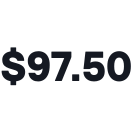
$32.50 for 5 envelopes
+ $65 subscription

$39 for 5 envelopes
+ $65 subscription
Docusign Enhanced
Bring your requirements (and your wallet)
Docusign's Enhanced plan comes with the two most expensive words in software: "contact sales".
Monthly allowance
There’s no published starting price, standard envelope allowance or simple list showing exactly what your subscription will include. Docusign says the plan can be customized around your requirements, with envelope limits determined by the terms of your individual agreement.
When going with their Enhanced plan, you’re not choosing a product from a pricing table. You’re negotiating a contract.
And while we couldn’t find reliable public records showing the exact amounts individual businesses were quoted for Enhanced, the broader pattern is worth noting.
G2 reviewers have found Docusign’s pricing frustrating because of rigid terms. At the same time, reviews on TrustRadius raise concerns about high costs, renewals, billing, and support.
Granted, those reviews aren’t proof that every Enhanced customer has the same experience. They are a good reason to read your quote very carefully before signing it, though.
Go annual with Docusign and get... Penalized?
Docusign discounts its annual plans, but there’s a strange trade-off hiding behind the lower price.
Standard and Business Pro monthly plans include ten envelopes per user per month. That gives you a total of 120 envelopes over the year.
Choose annual billing, and you get 100 envelopes per user for the entire year.
You’re giving Docusign the security of a twelve-month commitment. In return, they give you 20 fewer envelopes you could have had by refusing to commit.
Call it more flexible because it's a yearly pool instead of a monthly cap of 10 if you like. It still feels like being punished for loyalty.
What happens when you need support?
Standard Support is included with paid Docusign web subscriptions and has a target initial response time of under 24 hours.
Need help sooner? Get your wallet again.
Plus Support aims to respond within six hours. Premier brings that down to four. To get a target of under two hours, you need Enterprise Premier Support.
The prices for all three? Contact sales.
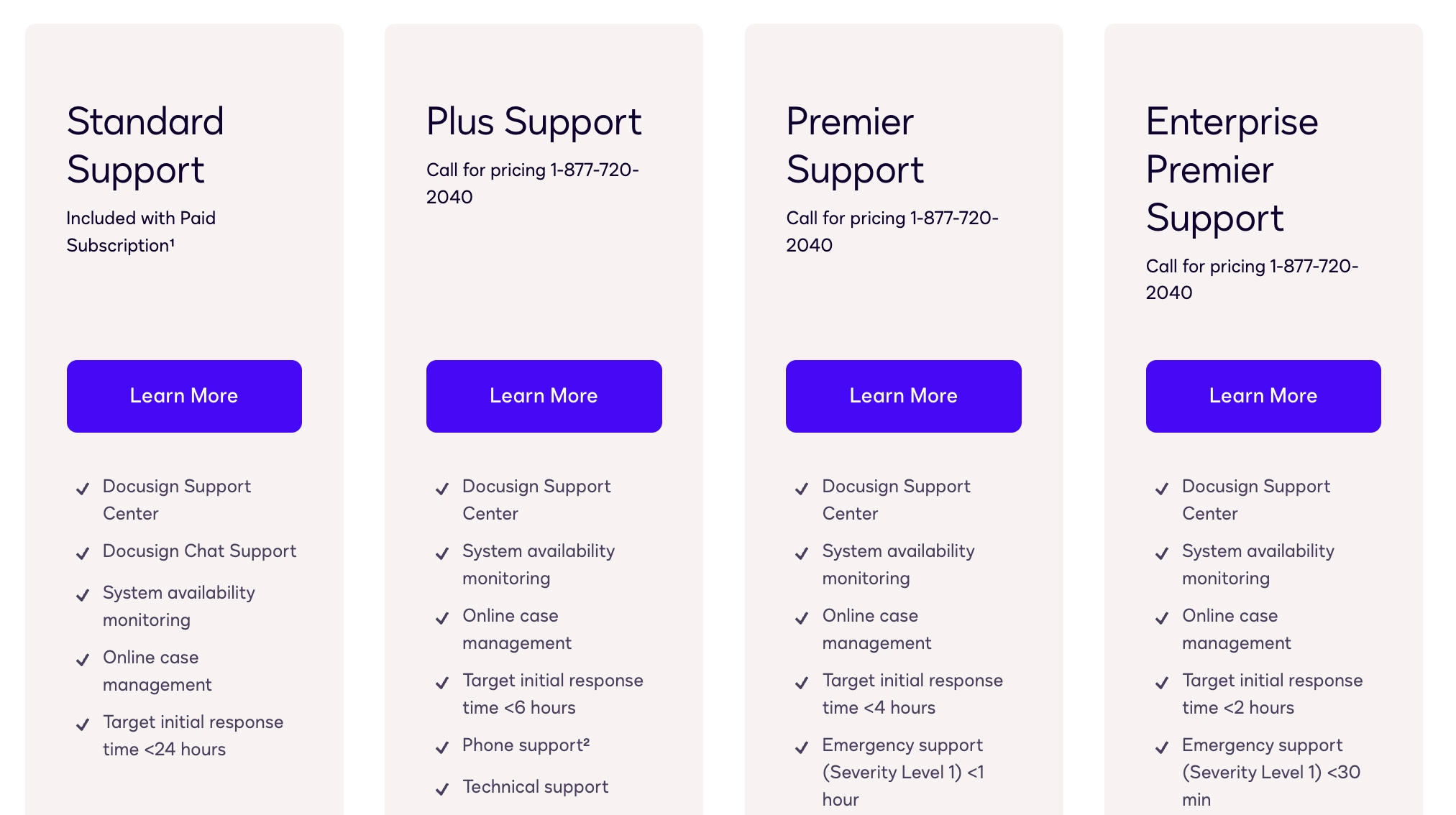
And notice the wording. Docusign is promising a target initial response time, not a resolution. Pay for Enterprise Premier and the aim is to reply within two hours, not necessarily solve anything.
So, after paying for a custom-priced Enhanced plan, you may also need a custom-priced support plan to get a reasonably quick response when that custom setup stops working.
In our experience, you don’t contact support to make small talk. You have a document that needs to go out, a client waiting to sign, or a payment that isn’t going through.
You need help now, not at some point within the next 24 hours.
That’s why Better Proposals includes human live-chat support on every plan, 24 hours a day, with an average response time of around two minutes.
Want API access? That’s a different pricing table
If you want to connect Docusign to your own app or build a custom integration, the regular eSignature plans aren’t the ones you’re looking for.
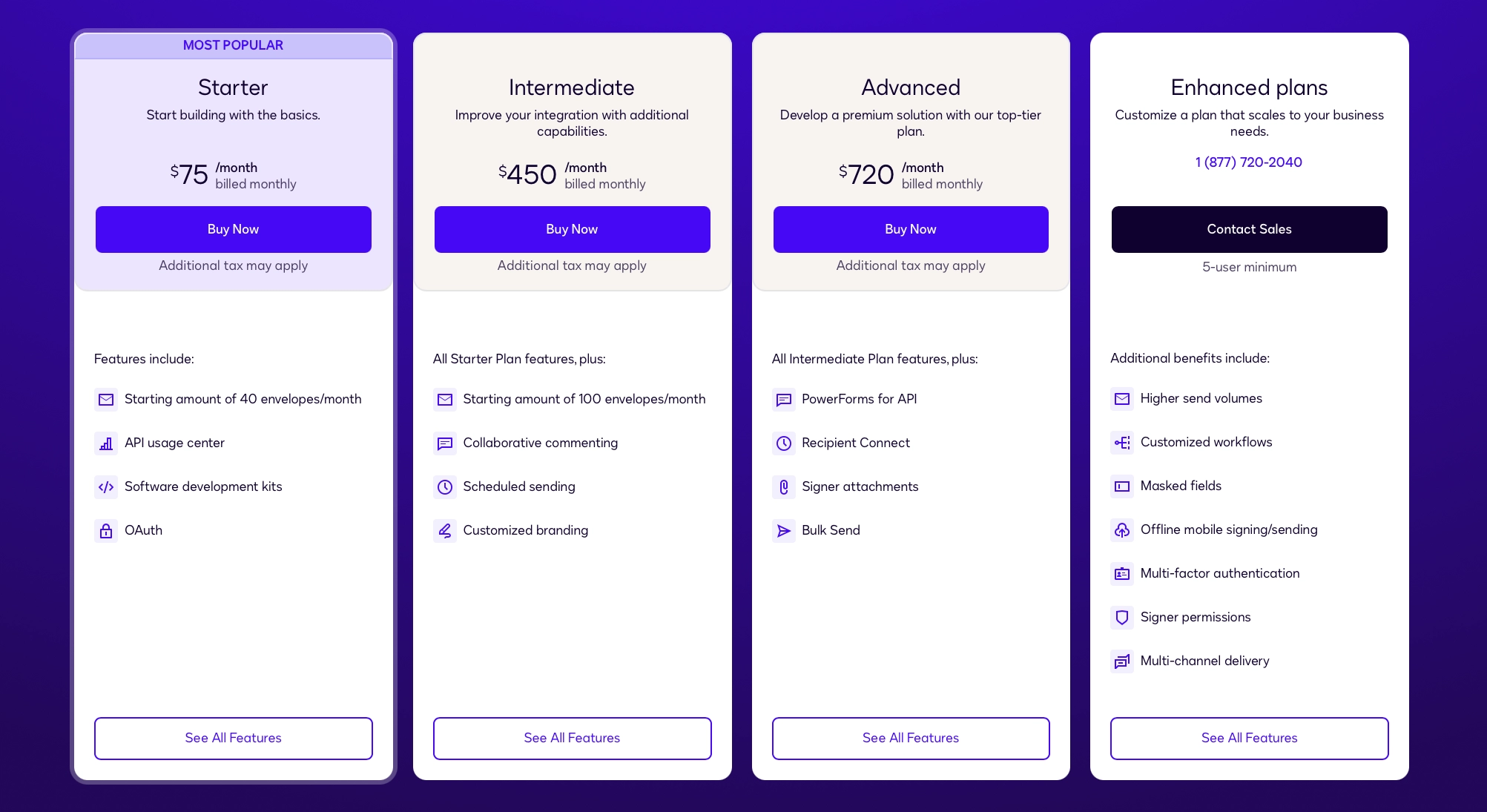
Docusign has a separate set of Developer API plans, with separate accounts and considerably higher prices.
You can open a developer account for free, but that’s only for building and testing in Docusign’s demo environment. The envelopes you send aren’t legally binding.
Once you’re ready to use your integration with real customers, you need to complete Docusign’s go-live process and move to a paid production account.
Here’s what that costs when paying month to month:
Final thoughts
With Docusign, the subscription will get you through the door. Quite a lot of what you'll want when you're in costs extra.
Extra envelopes cost extra. API access requires a higher-tier account. Faster support comes on custom-priced plans.
The pricing is also heavily geared towards annual commitments.
It’s a corporate-level pricing structure designed around negotiated custom contracts. For freelancers and small businesses, it’s mostly an excellent way to overpay.