Qwilr Pricing: Your Complete Buyer's Guide for 2026
Qwilr makes a great first impression. Its proposals look more like interactive web pages than documents, and the pricing starts at $49/user/month. Then, you start matching the plans to what you actually need. Let's take a look at what's included in the subscription price, what you'll pay extra for, and what you're committing to.
What we'll cover:
- What goes into your final Qwilr bill
- Qwilr Starter: The only option if you want monthly billing
- Qwilr Growth: Where custom branding starts at $3,300
- Qwilr Scale: Unlimited analytics history, $9,000 bill
Qwilr pricing at a glance
What determines your total Qwilr pricing
Your subscription isn't the final price you'll end up paying with Qwilr. It pays for users who can create an unlimited number of Qwilr Pages manually.
The keyword here is manually, because documents created through Qwilr's API come with limits. When you generate a Qwilr Page through their API, it uses up a document credit.
Each plan includes a limited number of credits, with a per-document charge for any overages. On top of that, if you choose the Starter plan, Qwilr takes a cut every time you get paid through your documents. So, when deciding on a plan, start with three numbers:
- How many people need access
- How many documents you expect to automate
- How many payments you intend to collect
Qwilr Starter
The only plan with monthly billing
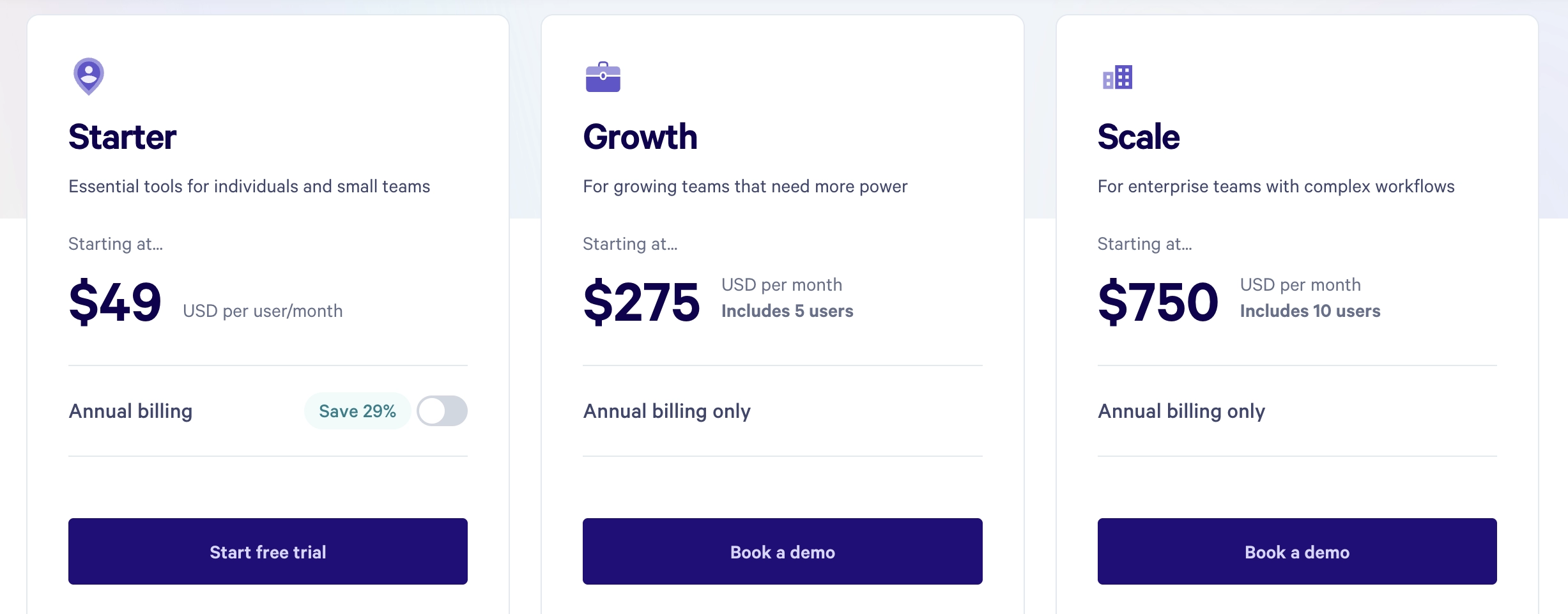
Starter is Qwilr's only plan without a multi-user minimum at $420 per user on an annual subscription.
It's also the only plan available with monthly billing. Choosing that option costs $49 per user per month, or $588 if you keep it for a full year.
Qwilr's Starter covers the proposal process for a freelancer or a small team. You can build your documents, let clients choose pricing options, collect signatures, and take payments.
The Starter plan also includes API access with 40 document generation credits included. Any additional documents created through the API will cost you extra. On the Starter plan, that's either $2.50 per document, or you can get yourself the 250 document bundle for $500.
Another limitation you'll see on Qwilr's Starter plan is that it only keeps 60 days of analytics history. If a client opens your proposal again three months later, that means you won't have the full history available inside Qwilr.
Qwilr gets paid (again) when you do
Starter comes with a 0.09% QwilrPay fee on every payment, in addition to Stripe's processing fees. This means your costs don't stop at the $420 annual subscription.
For example, let's take a $1,000 payment from a domestic card in the US. Stripe charges its standard 2.9% plus $0.30. Qwilr then takes another 0.09%, bringing the total fee to $30.20 and leaving you with $969.80.
Sure, the 90 cents that Qwilr takes on a $1,000 transaction isn't going to ruin your margins. That's hardly the point. The point is that you're already paying Qwilr $420/user/year, and then you pay them again each time your clients pay you.
The most expensive "remove ads" button you'll see all year
Qwilr doesn't let you have custom branding on Starter, but it isn't something that'll bother you when you're just starting out and the priority is getting a professional proposal in front of the client without spending days creating it.
As your business grows, that'll change. Now you're pitching higher-value work, sending more proposals, and dealing with clients who haven't met you before. At this point, Qwilr's branding starts looking like an ad inside your sales material. The only company you want the client to see in the final proposal is your own.
If custom branding is the feature that's pushing you to upgrade, you're going to pay $2,880 more to stop advertising the software you're already paying for. As a bonus, you now own four extra seats even if you're still the only person sending out proposals.
Qwilr Growth
Custom branding starts at $3,300
Growth has a five-user minimum and is billed annually, making its real starting price $3,300 upfront.
You get everything on Starter, plus custom branding, automations, identity verification, Microsoft Dynamics, and template-level settings. The template settings let you apply defaults like expiry dates and access rules, which becomes useful when several people are sending proposals.
Growth also gets rid of Qwilr's 0.09% payment fee, meaning you'll only be paying Stripe's processing fees. Analytics history increases from Starter's 60 days to 120 days. That's twice as long, but not necessarily long enough to cover a longer sales cycle.
When it comes to automation, the Growth plan includes 200 API document generation credits. Once you've used those, additional documents cost $2.50 each, or you can buy bundles of documents:
| Number of documents | Additional cost |
| 250 | $500 |
| 1,000 | $1,800 |
| 2,000 | $3,200 |
Better analytics, more homework for the client
Qwilr's Growth plan comes with identity verification, so you can finally put a name to the person reading your proposal. The catch is, your client will have to give it to you because Qwilr doesn't generate a unique link for each recipient.
Instead, you put a link live and ask clients to enter their name or email before they see the document. For sensitive information, that extra check can be useful, but it's a tradeoff. You get more information, they get a task. If they've got five minutes between meetings, that quick look they were going to take can quickly turn into "I'll get to this later".
Qwilr Scale
$9,000 with unlimited analytics
With a ten-user minimum and annual billing, Qwilr's Scale plan will set you back at least $9,000.
You get everything included in Growth, with the addition of Salesforce, conditional content, the Smart Proposal Engine, and AI Prefill. If you're looking to automate as much of your proposal process as possible, Scale has the tools for it.
This is also the plan where you finally get human live chat support and the only plan that offers unlimited analytics history. That said, if Salesforce is the main reason you're looking at Scale, you might want to consider other options before committing to Qwilr.
Paying at least $9,000 for ten seats and advanced automation features you might never use just to connect your proposals to the CRM your team works in hardly makes sense.
The plan for automation without the credits to match
Assuming you're going with Scale to automate, you'll want to know how many document credits your $9,000 subscription actually covers. The answer is 600 automatically generated documents per year. That sounds like a generous number until you start doing some math.
Over 12 months, those 600 credits work out to 50 credits per month. With a team of 10 people, that's 5 automatically generated documents per person. If each person generates ten documents a month through the API, Zapier, Make, or Qwilr's Smart Proposal Engine, the credits are gone in six months.
Don't worry though - once you've used up the 600 included generation credits, you can buy a bundle to bring the per-document price down:
| Number of documents | Additional cost |
| 250 | $500 |
| 1,000 | $1,800 |
| 2,000 | $3,200 |
| 5,000 | $7,500 |
Whether you buy a bundle or not, Qwilr doesn't pause your automations when your credits run out. It just keeps generating documents and starts charging you the pay-as-you-go rate per document. You can't set up a spending cap, either, so keeping the bill within budget becomes another manual job for your team.
Qwilr isn't your only option
Web-based proposals aren't exclusive to Qwilr. Neither are signatures, payments, branding, or automation. The real question is what you're paying to get those features.
With Qwilr, custom branding means a $3,300 annual subscription. Better Proposals' Premium has it at $249/user/year, alongside CRM integrations, API and Zapier access, and client onboarding.
You don't pay a separate fee for automatically created documents, give us a cut of client payments, or upgrade just to speak to a human on live chat. As your business grows, you add the people you actually need, not extra seats a plan requires you to pay for.
If Qwilr has a specific feature your workflow depends on, fair enough. If you want branded proposals, less manual work, and a great experience for your clients? You can get that without the $3,300 price tag.