Payments
PandaDoc Pricing in 2026: Plans, Costs, Limits, and Extra Fees
Oct 02, 2026
9 mins
You’re considering PandaDoc and want to know what you’ll get for your money. The advertised pricing is a starting point, but it doesn’t tell you the whole story.
Before we get into it, full disclosure. I talk to people who want to switch from PandaDoc on a regular basis, so this won't be just another breakdown of what's already on their pricing page.
Sure, we’ll look at what each plan actually offers, but we'll also get into what happens after you're a paying customer. Here's the full picture.
What we'll cover:
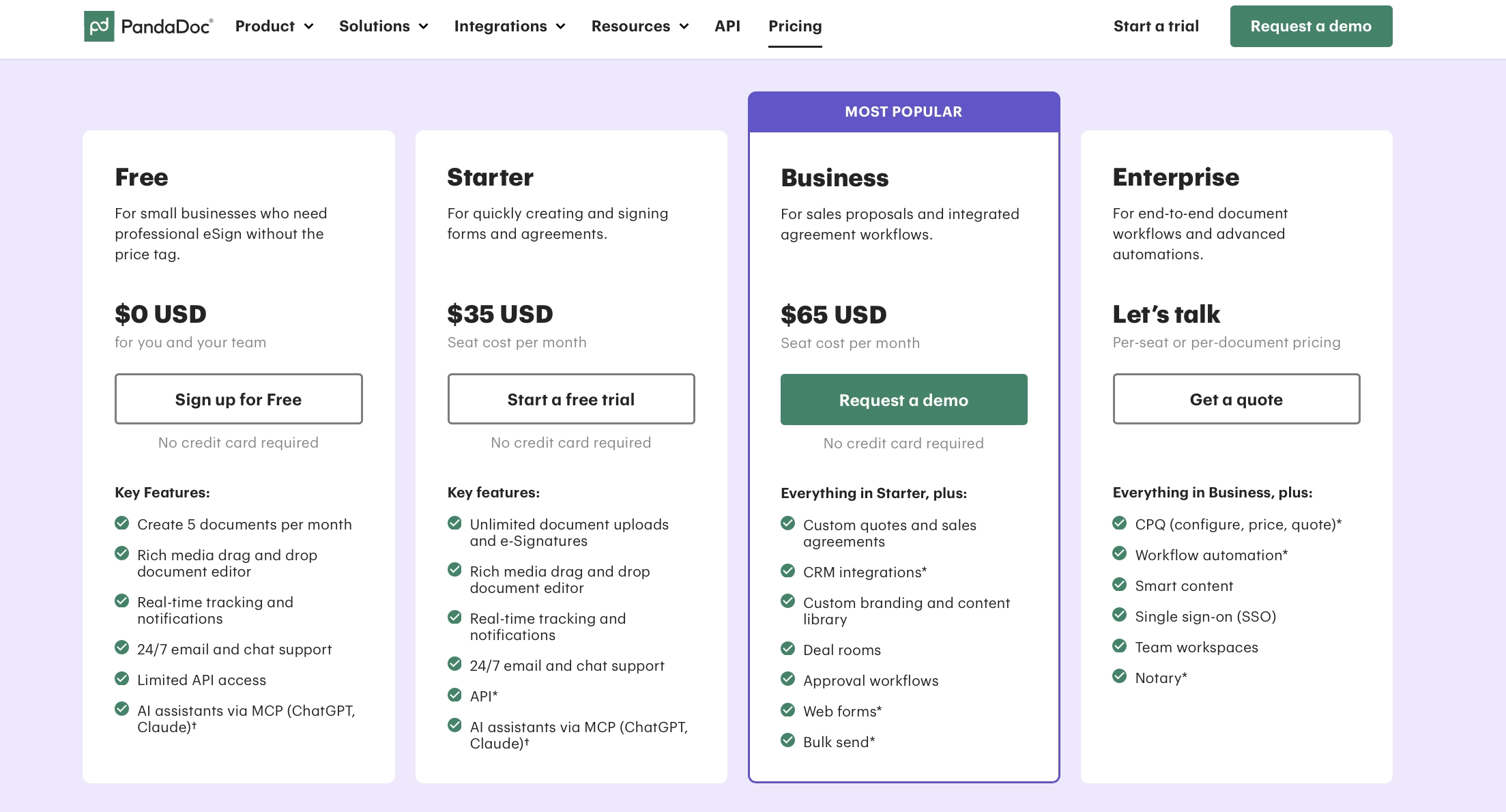
PandaDoc pricing at a glance
PandaDoc Free
Works for the occasional signature
PandaDoc offers a free eSign plan that lets you send 60 documents per year, with up to two recipients per document.
You upload an existing document and add signing fields. There’s no document editor or third-party integrations, and everyone you invite to the account gets an Admin role.
You can save five templates, but you can’t edit the text or layout in PandaDoc. If the wording changes, you’ll need to update the original file elsewhere and upload it again.
It’s a free plan, so it’s hard to complain too much about what’s missing. If you already have a finished document and just need it signed, it does the job. The limits become a problem when you need more than that.
Two recipients won’t cover an agreement that needs three signatures, five templates leave little room for different document types, and you’ll need another tool to write and edit the content.
For the occasional signature, that’s a fair trade-off. For creating and managing proposals, you’ll need a paid plan.
PandaDoc Starter
Not much of a proposal plan
Starter costs $35/user/month, or $228/user/year on annual billing with only five templates and no pricing tables.
You get a document editor, unlimited signatures, and basic analytics like who hasn't signed and how much time they've spent on a page. If you mainly send straightforward contracts or agreements with fixed terms and prices, it may cover what you need.
For proposals, you’ll start running into the gaps sooner. Clients can’t select packages or optional services, and there’s no product catalog or content library to save you from repeatedly adding the same prices and content.
Once you need pricing tables, more than five templates, or just want your own branding, you’ll need Business. That takes the annual cost from $228 to $588 per user.
What’s missing
PandaDoc Starter covers unlimited signatures, but it doesn't include:
Adding your logo and fonts to your documents
Interactive pricing tables that let clients choose between packages or add optional services
Payments
Product catalog
Unlimited templates
Document reports
Content library for storing and reusing your own content
Detailed analytics showing the order in which your sections were viewed and what was skipped
Email whitelabeling so your documents are sent from your own email address
With PandaDoc Starter, you’re paying $228 a year for software that makes you upgrade for using your own logo and email address.
For comparison's sake, Better Proposals offers a Starter plan at $19/month or $149/year. You can add your own logo to your documents, they'll be sent from your email address, and come with interactive pricing tables and detailed tracking.
For $79 less per year, you can also save unlimited templates, add your products and services into the system, and reuse your own content.
Now with fewer features at the same familiar price
Yes, you did read that right. PandaDoc's old Essentials plan used to include both pricing tables and unlimited templates. Then, PandaDoc renamed the plan Starter, removed pricing tables, and capped templates at five with no change in pricing.
The most common complaint I hear when talking to PandaDoc's customers looking to switch is that features they used to have are suddenly no longer included in their plan.
Keeping them means upgrading. Staying put means paying the same amount for less.
Now, if you're a bit skeptical, no one can blame you. You are reading this on a competitor's website. But you don't need to take my word for it. PandaDoc's customers have spoken out about this in public reviews as well. You can find one account here and another one here.
PandaDoc Business
More included, plenty sold separately
Business will set you back $65/user/month, or $588/user/year if you go with annual billing. It's also the plan where proposal features start.
If you need pricing tables, payments, and reusable content, Business is the first PandaDoc plan that covers it. It also adds unlimited templates, approval workflows, expiration dates, and a product catalog.
Speaking of adding, you also get access to multiple add-ons that will cost you extra. For example, even though you now have approvals available for your team, content locking is a paid add-on.
If you want documents to come from your own email, it'll cost extra. The document links themselves will still load on app.pandadoc.com. Then, there's automation, which is also a paid add-on that requires usage credits.
What are PandaDoc usage credits?
A usage credit is PandaDoc’s unit for automated document generation. Each new document created through an integration or automated workflow consumes one credit.
This includes their API, Zapier, Make, Forms, bulk send, and CRM integrations. If you're a first-time customer, you'll get 25 of those credits on Starter and 50 on Business.
When the initial credits run out, you can either buy a usage credit pack or pay per document generated. Seeing that this introduces additional costs, you'll want to know how many credits there are in a pack and how much you'll pay.
Unfortunately, PandaDoc doesn’t publish a clear price list for those packs. Their documentation sends you to your account’s billing page to see your options.
That said, the screenshot below was taken from their help article on this, and it clearly shows $100 for 50 credits. That’s $2 per generated document.
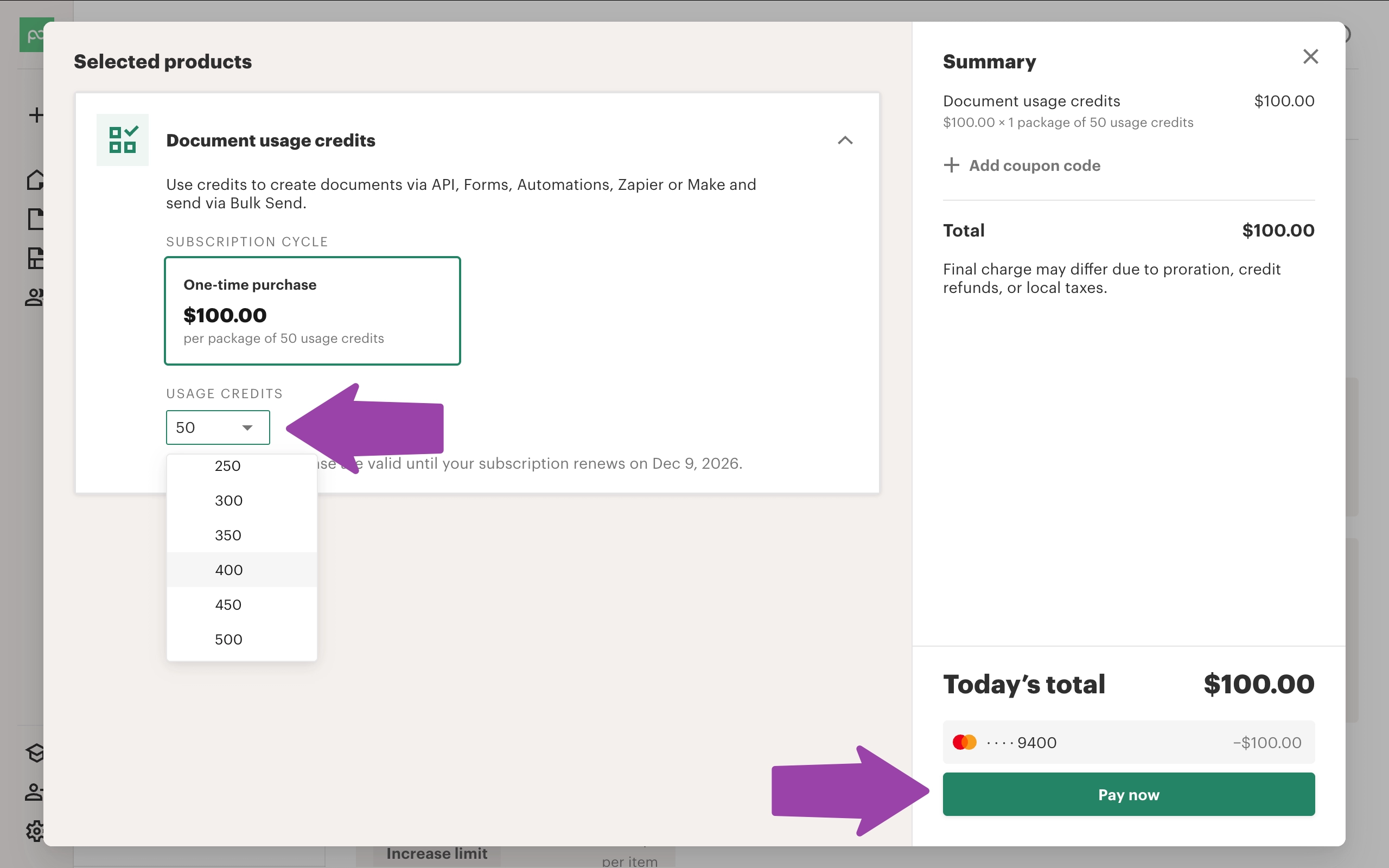
A customer on an annual Business plan reported the same $2 charge for documents generated through Make in July 2026.
While that does give you an example, it's not a clear answer about what you'll end up paying on top of your subscription.
What’s missing
On Business, connecting your documents to your workflow isn't included:
No custom domain for sending documents from your own branded URL
No detailed analytics showing the order in which sections were viewed and what was skipped
The Salesforce integration is an add-on
Content locking is an add-on
Forms are an add-on
Sending from your own email address is an add-on
CRM and project management integrations are add-ons
API usage, as well as automations through Zapier or Make are also add-ons
Even after paying $588/user/year, you’re still checking which parts of your workflow are sold separately.
If you're working alone and want most of the features above, you can get them for half the price with Better Proposals' Premium plan. It's $249/user/year, and your CRM and forms aren't add-ons.
And if you have a team and also need manager approvals and content locking, Better Proposals’ Enterprise plan includes it for $499/user/year.
PandaDoc Enterprise
Ask sales
Enterprise has no public price, so you’ll need to talk to sales. This is where the conversation becomes about what they’re ready to offer you.
By all accounts we've heard in our own demos, the conversation usually goes like this: PandaDoc asks you if you're considering any other options. If you are, they'll ask for the price, then come back to you with a lower quote.
An attractive offer. That is, until you realize that promotional pricing and special offers don't apply to the renewal term. In simple terms, it's not what you'll be paying next year.
By then, you’ve set up your templates, connected your integrations, and got your team using the software. The discount expires, but the work involved in leaving doesn’t.
What you're signing up for beyond the price
Before committing to PandaDoc, there are a few things worth putting alongside the subscription cost:
- Features can disappear from an existing plan. PandaDoc has changed the features a plan includes on multiple occasions for existing customers.
- Custom domains aren't available on any of the plans. No matter how much you pay, your document links will still say PandaDoc.
- Add-ons require further spending. This includes sending from your own email, forms, automations, Salesforce, and API no matter your plan.
- Support starts with a chatbot. PandaDoc’s support process routes you through the bot before a live agent or ticket.
- Better support is an upsell. "Premium Support" is a paid add-on described as “fast SLAs” and “proactive support” without a clear public price or specific response-time commitment.
Choose a plan you can keep counting on instead
The problem with deciding on a PandaDoc plan isn’t just what the subscription costs. It’s having to budget for add-ons, check the renewal price, and wonder whether the features you rely on will stay included.
At Better Proposals, we grandfather your price and features for as long as you’re a customer. You'll get new features as we release them, but we won't take away something you already had.
There are no secret codes or pricing hacks either. The only discount we offer is on annual plans and it's available to everyone. Fast, human replies when you need help isn't a premium either - we just call that support.