You Can Use ChatGPT for Proposal Writing.
But Should You?

ChatGPT is a good tool to use to help you to think through a proposal, from summarizing your discovery call to working out the scope and testing pricing options. It can even write the whole proposal for you.

But all it gives you is text, and it's up to you to turn that text into something your client can read comfortably, sign, and pay for with as little friction as possible. Better Proposals helps you turn the work you've done in ChatGPT into a professionally designed proposal your client will want to accept.

14-day free trial. No credit card required.

Using ChatGPT to prepare your proposal

ChatGPT is most useful for the work you do before you start writing, it's good when it comes to understanding the client needs, deciding what's included in the job, and working out what to charge. It also helps when a section isn't coming together.

Summarizing your discovery call

Paste in your notes or the call transcript and ask ChatGPT to pull out what the client wants to achieve, their worries, and anything they said about budget or deadlines. It's a quick way to make sure nothing important gets lost before you start writing.

Keeping each client's details in one place

If a proposal takes a few days to come together, a ChatGPT Project keeps your call notes, email threads, and earlier chats about that client together, so you don't have to explain everything again every time you open a new chat.

Working through scope and pricing

Ask which questions you haven't asked the client yet, which assumptions you should spell out in the scope, or how you could split the work into packages. You still decide what goes in, but it's useful to get a second opinion before you commit to a number.

Drafting and rewording sections

If you keep rewriting the same paragraph, ChatGPT can suggest a few different ways to approach it or tighten a section that's running long. Use its versions as a starting point and write the final wording yourself.

Better Proposals helps you turn that thinking into a professional proposal that

first icon
Looks good

first icon
Sends properly

first icon
Tracks client activity

first icon
Gets signed

first icon
Helps you win the work

Where ChatGPT falls short

ChatGPT's limits are worth knowing before you rely on it to write a whole proposal.

It only knows what you give it

ChatGPT works from the notes and details you paste in, so it can't know which of the client's concerns mattered most to them, what you've learned from similar projects, or how much flexibility you have on price. Those details are what make a proposal convincing, and they have to come from you.

It can get details confidently wrong

ChatGPT can state prices, timelines, or facts about the client's business as if they're correct, even when they aren't. Check every figure and claim in a ChatGPT draft against your own rates and your notes before it goes anywhere near your client.

Its drafts tend to sound alike

Ask ChatGPT for a proposal and the wording is usually polished but general, the kind that could have been written for any client. A proposal that reads like that makes it harder for your client to see why you're the right choice.

It gives you text and nothing else

ChatGPT gives you words in a chat window. Turning them into a proposal means copying them into a document, formatting it, adding your branding and a price breakdown, sending it as a file, and arranging the signature and payment separately.

What your client sees when they open your proposal

The way your proposal reaches your client shapes how they read it and how quickly they can say yes. Here's how the two compare from their side.

A proposal written in ChatGPT

A proposal written in ChatGPT usually reaches the client as text in an email or as a Word or PDF attachment. On a phone, that means downloading the file and zooming in to read it. Questions go back and forth by email, there's no way for the client to choose between options and see the price change, and signing usually means printing the document, scanning it, and sending it back, with payment handled through a separate invoice.

A proposal sent with Better Proposals

Your client opens the proposal from a link, and it's designed with your branding and reads comfortably on any device. If you've included optional extras, they can select the ones they want and watch the total update. They can ask you questions over live chat while they're reading, sign with a legally binding eSignature as soon as they've decided, and pay a deposit through Stripe, PayPal, or GoCardless without leaving the page.

Stripe PayPal GoCardless
 

What happens after they sign

Once they’ve signed, they’re immediately guided through an onboarding flow where they can fill in your forms and book a kick-off call with you. Our Premium and Enterprise plans let you fully customize the onboarding process to suit each client.

signature icon

ChatGPT has a place supporting your Better Proposals workflow

How you work
What Better Proposals gives you
Where ChatGPT can help
  Freelancer sending a few proposals a month
Freelancer sending a few proposals a month

A ready-made template and eSignatures, so you can send a finished proposal on your own

Turning your call notes into a first outline of the scope

  Agency with several people writing proposals
Agency with several people writing proposals

Comments and collaboration on the same proposal, and a Content Library of approved sections

Drafting first versions of sections for different services

  Sales team with set pricing and terms
Sales team with set pricing and terms

Content locking on our Enterprise plan, so approved terms and pricing can't be changed

Preparing questions for discovery calls

  Retainer or subscription work
Retainer or subscription work

Recurring monthly or annual payments set up when the client signs

Planning monthly deliverables

Adding ChatGPT to your Better Proposals workflow

There’s no direct integration between ChatGPT and Better Proposals yet, but you can connect the two through Zapier. Without Zapier, you’ll move the client summary, scope, and pricing options you worked out in ChatGPT into a Better Proposals template manually. From there, you write them up into the finished proposal your client reads, signs, and pays for.

divider

Start from a ready-made template

Pick one of our 260+ templates for your industry. Each one already has sections for the client's problem, your solution, scope, pricing, and next steps, so each part of what you worked out in ChatGPT has a section to go into.

our templates

Set up your pricing table

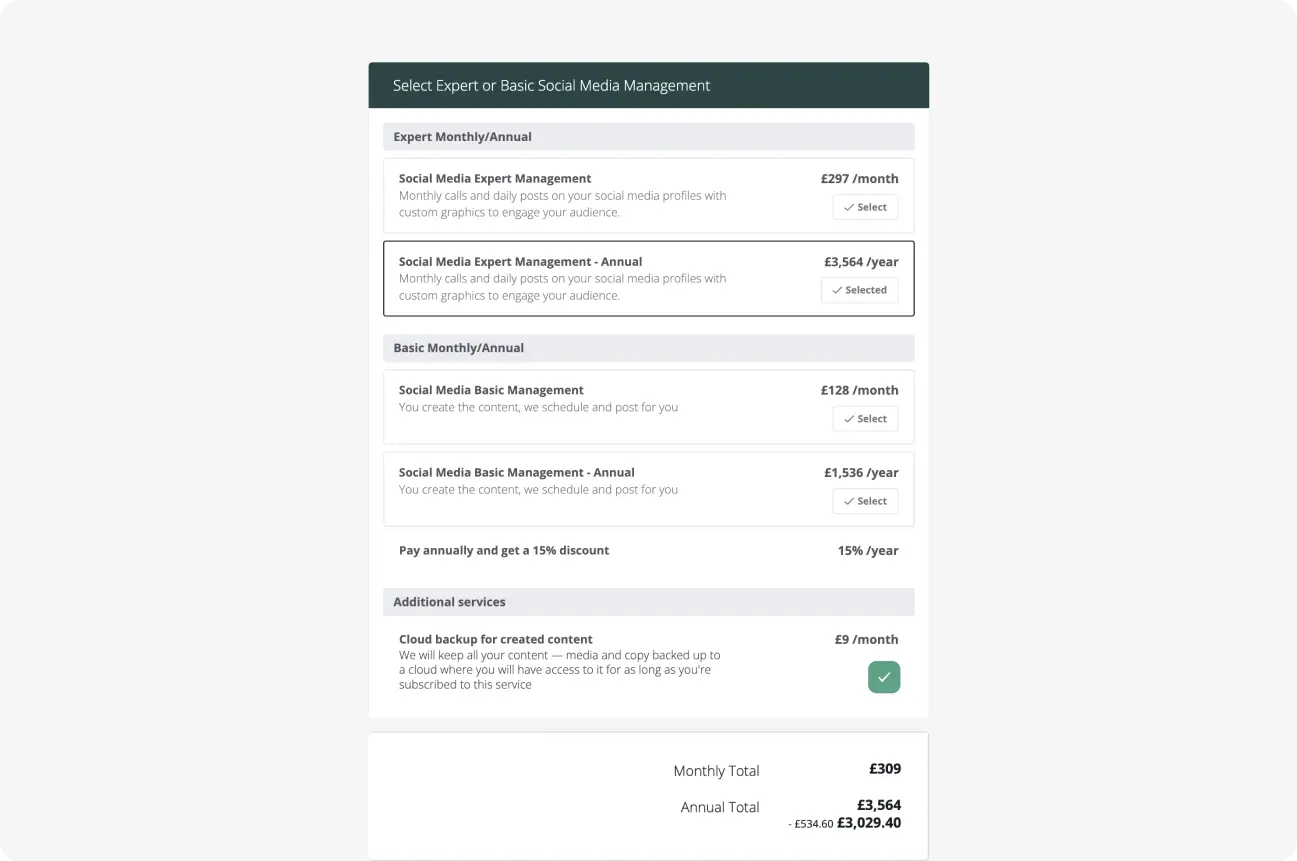
Add each item from the scope you worked out in ChatGPT to the pricing table, with its price. Anything the client can choose to add on, like an extra round of revisions, can be marked as optional. Your client then selects the optional items they want, and the total updates as they do.

Interactive pricing tables automatically calculate the total based on selected options. Add packages, apply discounts, or include optional services. Interactive pricing tables automatically calculate the total based on selected options. Add packages, apply discounts, or include optional services.
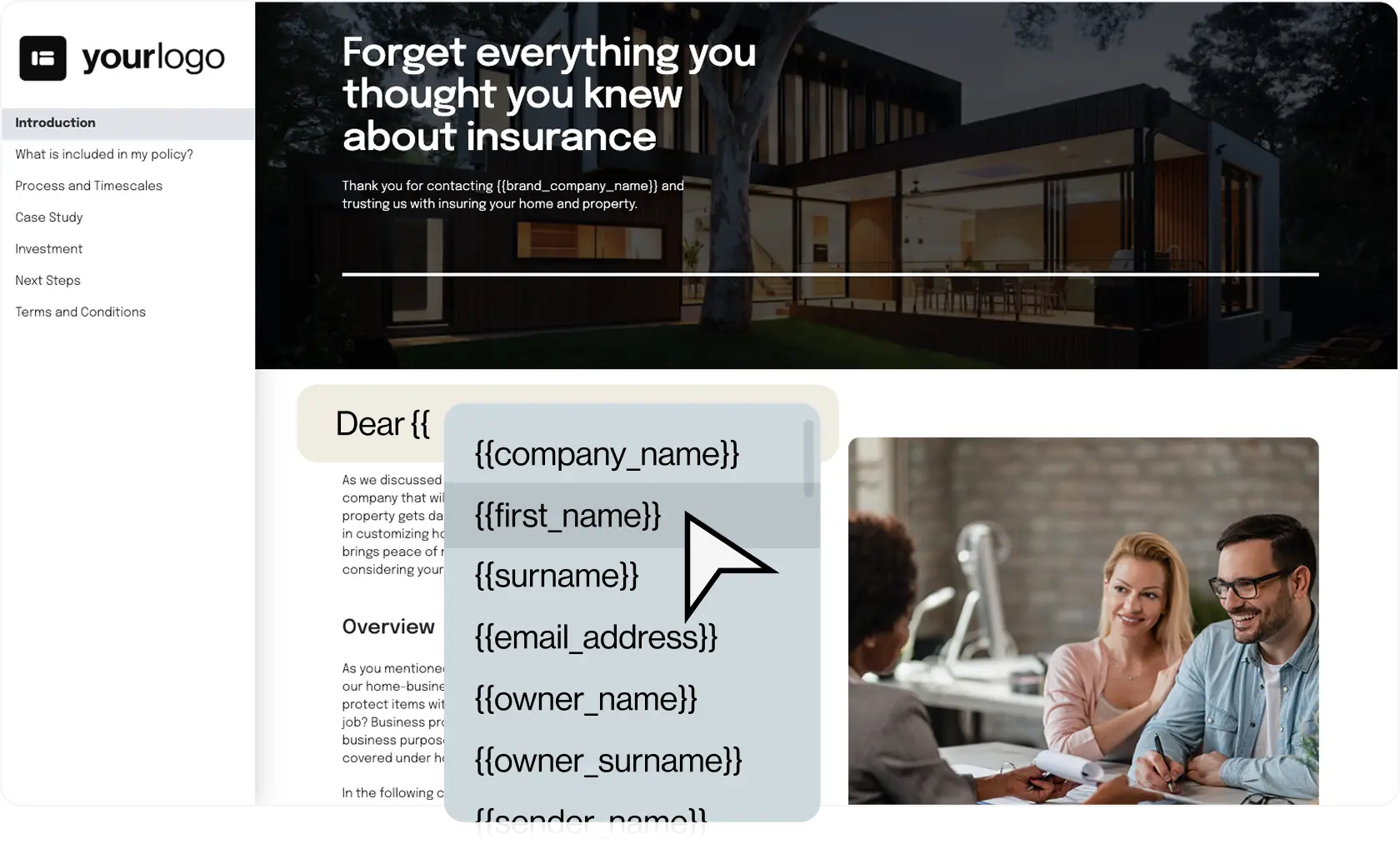
Merge tags fill in the important information for you so mistakes like writing a wrong name don't creep up.

Let merge tags fill in the client's details

Merge tags are placeholders for details like the client's name and company. They fill in from the contact details you've added to the proposal, so you add the client once and their details appear everywhere you've used a merge tag.

Save the sections you'll reuse

Once you're happy with a section you'll need again, like your process or your terms, save it to the Content Library, and add it to any future proposal from the editor.

Interested in our CLI & AI Integration?

If you'd rather have your AI create the proposal directly in your account, our Premium and Enterprise plans connect AI tools that support MCP, like Claude and Cursor. Find out more about our AI proposal generator.

Try it Free

What about pricing?

ChatGPT has a free plan, and if you just need somewhere to brainstorm, double-check a paragraph, or get unstuck, that might be enough. The free plan has usage limits, though. If you use ChatGPT for proposal prep every week, ChatGPT Plus raises those limits and adds Projects, so each client’s notes and chats stay in one place. Teams can share a workspace on ChatGPT Business, which needs at least two users.

Whichever plan you’re on, ChatGPT only covers the thinking.

You still need to turn that thinking into something your client can open, read, understand, and act on. That means designing it, laying out the pricing, sending it, and getting it signed and paid for. Better Proposals is built around that part of the process, from presenting the work properly to making it easy for your client to say yes.

Our Starter plan gives one user up to 10 proposals a month, with templates, eSignatures, payments, and tracking included. Our Premium plan adds unlimited users, 50 proposals a month, your own domain, and the AI integration. Our Enterprise plan adds unlimited proposals, content locking, and manager approvals. You can try any Better Proposals plan free for 14 days without a credit card.

Pay annually to save up to 35%

Starter

Perfect when just starting out.

$13

/user per month

$19 /user per month when paid monthly

Try it Free

Core features:

  • Legally binding digital signatures
  • Interactive pricing tables
  • Payment integrations
  • Content Library
  • Notifications and analytics

Premium

Ideal for any small business.

$21

/user per month

$29 /user per month when paid monthly

Try it Free

Everything in Starter, plus:

  • Custom domain
  • CRM integrations
  • Automatic expiry dates
  • API/Zapier
  • Custom onboarding flows and forms

Enterprise

Designed for sales teams.

$42

/user per month

$49 /user per month when paid monthly

Try it Free

Everything in Premium, plus:

  • Content locking
  • Simultaneous editing
  • Inline commenting
  • Manager approvals
  • Advanced user permissions

FAQs

Will my client know I used ChatGPT?
Your client only sees the finished proposal, not the tools you used to write it. What they will notice is whether it talks about their business specifically, so make sure the details from your call with them are in it.
Can ChatGPT connect to Better Proposals?
Not directly yet, but you can connect ChatGPT to Better Proposals through Zapier. Without Zapier, you’ll copy what you need from your chats into a Better Proposals template.
Is it safe to put client information into ChatGPT?
That depends on your ChatGPT settings and any confidentiality agreement you have with the client. If you're not sure, remove names, figures, and other sensitive details from your notes before you paste them in. Your proposals and client details in Better Proposals are encrypted, and our security page explains how we keep them safe.
Which Better Proposals plan do I need?
You can build proposals from our templates on any plan. If you'd also like an AI tool to connect to your account, our Premium and Enterprise plans include the AI integration. You can try everything free for 14 days without a credit card.

Send a proposal your client can sign the moment they're ready

Start your free trial, pick one of our templates, and build your next proposal from the work you've already done in ChatGPT.

Try it Free

14-day free trial. No credit card required.